
GULF CLUB 2026 : INFINITE PARTY
ซื้อบัตร / Buy Ticket ตรวจสอบรายการ / View Order สมัครสมาชิก / Register บัญชีของฉัน / My Account คำถามที่พบบ่อย/FAQ
GULF CLUB 2026 : INFINITE PARTY
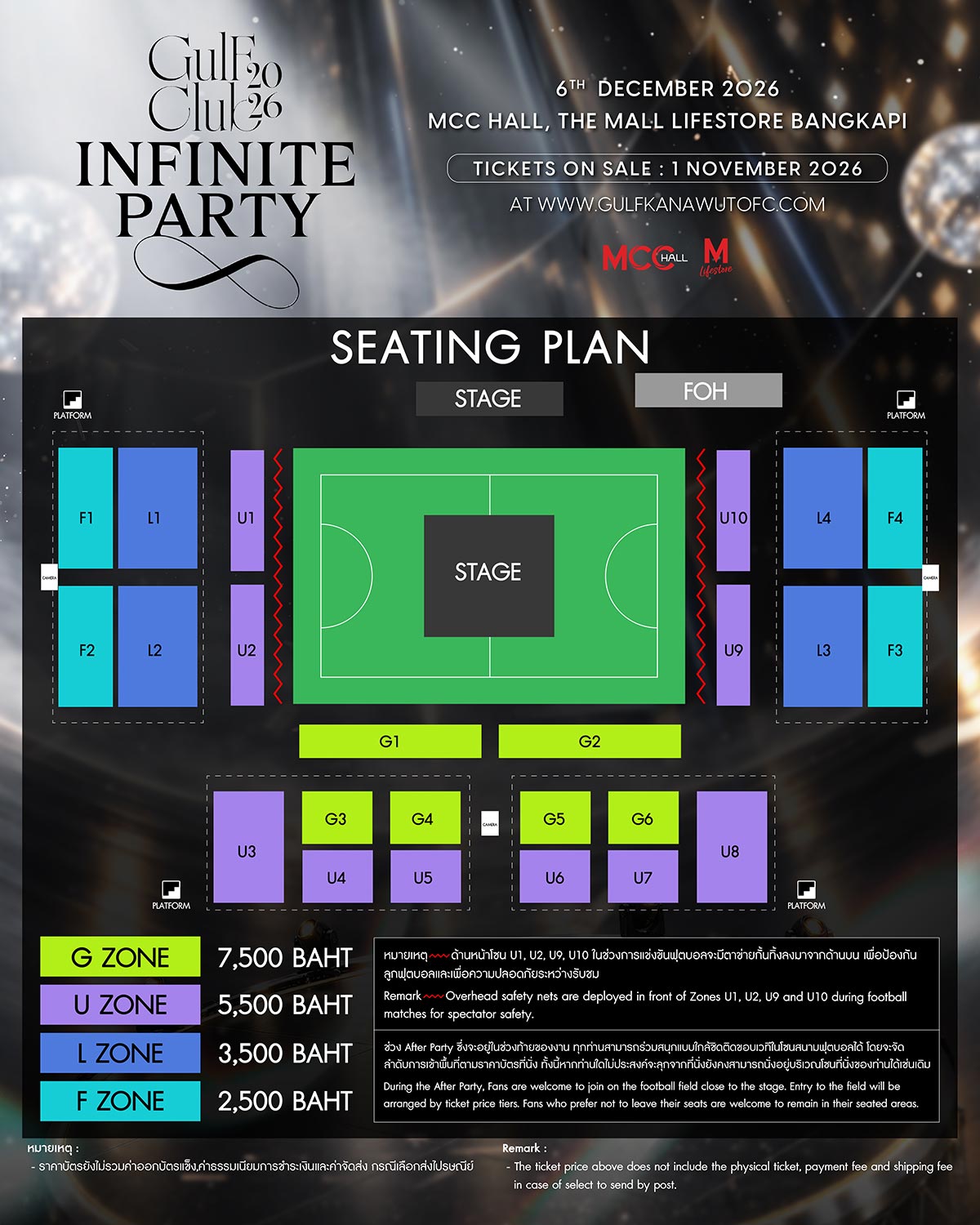
►กำหนดการแสดง: วันอาทิตย์ที่ 6 ธันวาคม พ.ศ. 2569 เวลา 15:00 น.
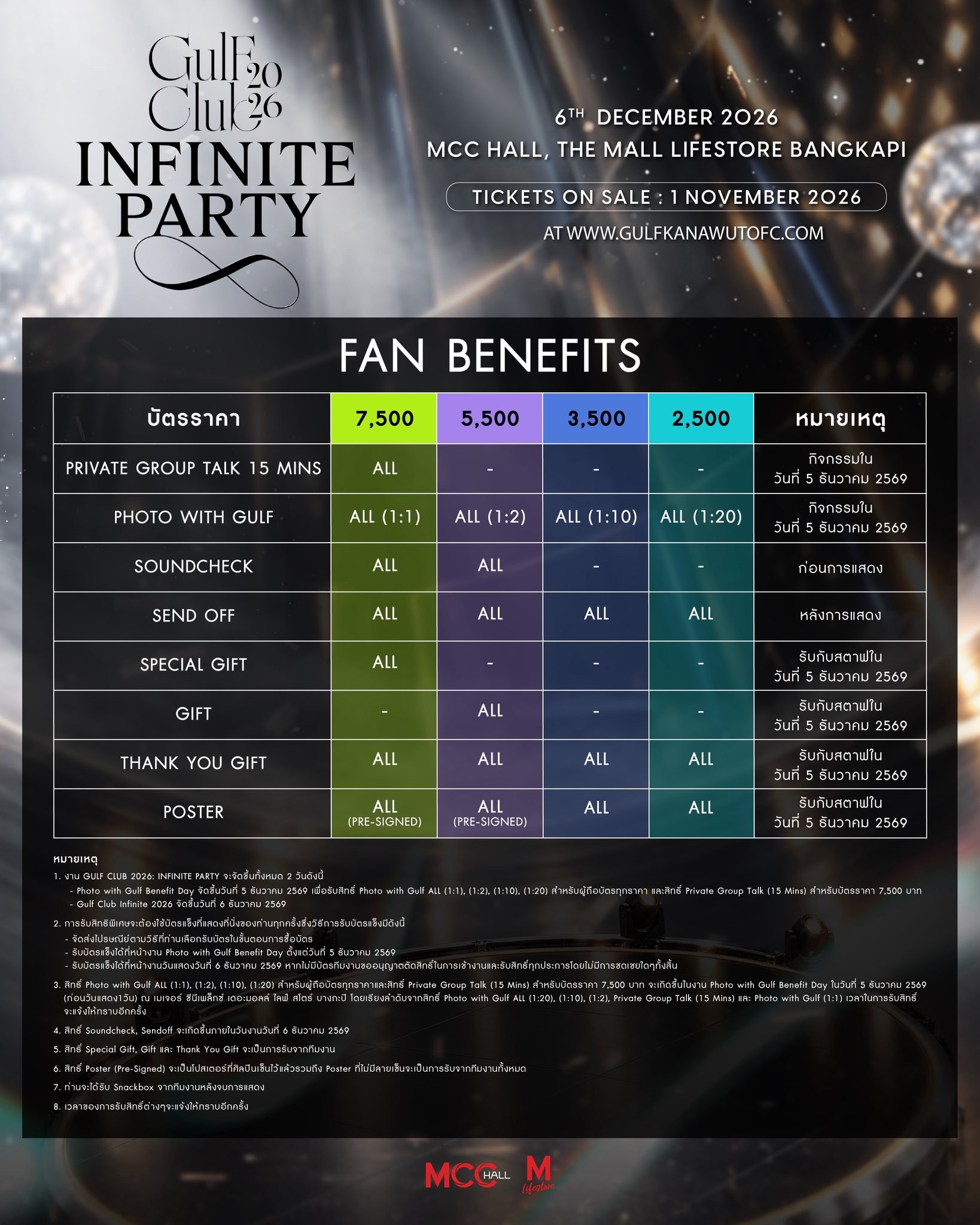
►วันกิจกรรม Photo with Gulf Benefit Day: วันเสาร์ที่ 5 ธันวาคม 2569
►สถานที่: MCC HALL, THE MALL LIFESTORE BANGKAPI
►ราคาบัตร: 7,500 / 5,500 / 3,500 / 2,500 บาท
►กำหนดการเปิดจำหน่าย: วันอาทิตย์ที่ 1 พฤศจิกายน 2569 เวลา 10:55 น. เป็นต้นไป
►ช่องทางการจำหน่าย: https://gulfkanawutofc.com
Terms and Conditions รายละเอียดและขั้นตอนการสั่งซื้อ (เงื่อนไขและข้อกำหนด)
1. การลงทะเบียนสมาชิก: ผู้ที่ประสงค์จะซื้อบัตรทุกท่านจำเป็นต้องลงทะเบียนสมัครสมาชิกทางหน้าเว็บไซต์ https://gulfkanawutofc.com สำหรับการเปิดจำหน่ายบัตรในครั้งนี้ ท่านที่เคยมีบัญชีผู้ใช้งาน (User Account) อยู่แล้วสามารถเข้าสู่ระบบและทำรายการสั่งซื้อได้ทันที
2. ขั้นตอนเมื่อเปิดจำหน่ายบัตร
2.1 เข้าสู่ระบบ (Login) โดยใช้ User และ Password ที่ได้ลงทะเบียนไว้
2.2 เลือกโซนที่ต้องการ
2.3 เลือกที่นั่งที่ต้องการ, เลือกวิธีการรับบัตร (รับเองที่หน้างาน หรือจัดส่งทาง EMS มีค่าจัดส่ง 70 บาท และจัดส่งเฉพาะภายในประเทศไทยเท่านั้น) จากนั้นกดเข้าสู่ขั้นตอนถัดไป
(1) กรณีเลือกรับเอง: สามารถรับบัตรได้ที่หน้างานก่อนเวลาเริ่มการแสดงประมาณ 4 ชั่วโมง จนถึงเวลาเริ่มการแสดง
(2) กรณีเลือกจัดส่ง EMS (แนะนำเพื่อลดความแออัดหน้าสถานที่จัดงาน): ทางทีมงานจะเริ่มดำเนินการจัดส่งบัตรล่วงหน้าก่อนวันจัดงานประมาณ 7 วัน ด้วยบริการไปรษณีย์ไทย โดยจะมีเลขพัสดุ (Tracking No.) แจ้งให้ทราบในเมนู "View My Order" (ตรวจสอบรายการ) ทั้งนี้ เจ้าของบัญชีผู้ใช้งานจะต้องตรวจสอบและอัปเดตข้อมูลที่อยู่จัดส่งในหน้า "View My Order" ให้ถูกต้องครบถ้วนล่วงหน้าก่อนถึงกำหนดการจัดส่งอย่างน้อย 1 สัปดาห์ หากข้อมูลที่อยู่จัดส่งไม่ครบถ้วนหรือไม่ถูกต้อง ขอสงวนสิทธิ์ไม่ดำเนินการจัดส่งและไม่คืนค่าธรรมเนียมการจัดส่งทุกกรณี
2.4 เลือกวิธีการชำระเงิน แล้วกดสั่งซื้อ โดยท่านจะมีเวลาในการทำรายการชำระเงินในแต่ละครั้งไม่เกิน 10 นาที ทั้งนี้ ท่านจำเป็นต้องดำเนินการชำระเงินให้เสร็จสิ้นก่อนรอบเวลาของคำสั่งซื้อจะหมดลงอย่างน้อย 5 นาที เนื่องจากหลังจากการชำระเงินอาจมีความเสี่ยงที่ระบบการเงินหรือเกตเวย์จะประมวลผลและส่งยอดไปปลายทางไม่ทันตามเวลาที่ระบบกำหนด หากท่านชำระเงินเกินจากเวลาที่กำหนดจนส่งผลให้คำสั่งซื้อหมดอายุหรือไม่ได้รับบัตร ทางผู้จัดงานขอสงวนสิทธิ์ในการพิจารณาคืนเงิน หรือจัดสรรที่นั่งในโซนอื่นที่มีมูลค่าเทียบเท่ากันให้ทดแทน ซึ่งอาจส่งผลให้ท่านไม่ได้รับที่นั่งตามที่เลือกไว้ตั้งแต่แรก
หากดำเนินการชำระเงินไม่สำเร็จ ท่านสามารถเข้าสู่เมนู "View My Order" เพื่อเลือกวิธีการชำระเงินแบบอื่นหรือทำการชำระเงินใหม่อีกครั้งภายในระยะเวลาที่กำหนด
(1) กรณีชำระผ่านบัตรเครดิต / บัตรเดบิต / ผ่อนชำระ (VISA, MasterCard, JCB, CUP, Alipay): ระบบจะนำท่านเข้าสู่เกตเวย์การชำระเงิน (มีค่าธรรมเนียม Convenience Fee เพิ่มเติม 4%) เมื่อชำระเงินผ่านระบบเรียบร้อยแล้ว คำสั่งซื้อจะมีสถานะเป็น "เสร็จสิ้น" โดยอัตโนมัติทันที ไม่ต้องส่งหลักฐานการโอนเงิน หากทำรายการไม่สำเร็จหรือต้องการเปลี่ยนบัตร ให้ไปที่เมนู "View My Order" เพื่อทำการชำระเงินใหม่อีกครั้งภายในระยะเวลาของรอบคำสั่งซื้อ
(2) กรณีชำระผ่าน QR Code / PromptPay: ระบบจะสร้าง QR Code เพื่อชำระเงินผ่าน Mobile Banking Application ของทุกธนาคารในประเทศไทย เมื่อชำระเงินเสร็จสิ้น สถานะคำสั่งซื้อจะเปลี่ยนเป็น "เสร็จสิ้น" อัตโนมัติทันที ไม่ต้องส่งหลักฐานการโอนเงิน หากทำรายการไม่สำเร็จ ให้ไปที่เมนู "View My Order" เพื่อทำรายการชำระเงินใหม่อีกครั้งภายในระยะเวลาของรอบคำสั่งซื้อ
2.5 ในการทำรายการจองบัตร 1 ครั้ง สามารถจองได้ครั้งละ 1–4 ใบ หากต้องการจองมากกว่า 4 ใบ สามารถทำรายการสั่งซื้อรอบใหม่เป็นครั้งที่ 2 โดยใช้บัญชีผู้ใช้งานเดิม ทั้งนี้ หากตรวจพบพฤติกรรมการจองที่ผิดปกติ การใช้ระบบอัตโนมัติ (Bot/Script) หรือการกระทำใดๆ ที่เข้าข่ายทุจริต ทางทีมงานขอสงวนสิทธิ์ในการยกเลิกคำสั่งซื้อและตัดสิทธิ์การเข้าชมโดยไม่ต้องแจ้งให้ทราบล่วงหน้า และไม่มีการคืนเงินทุกกรณี
3. ค่าธรรมเนียมและรูปแบบบัตร: ราคาบัตรดังกล่าวยังไม่รวมค่าธรรมเนียมการดำเนินการออกบัตร ใบละ 50 บาท (และไม่รวมค่าจัดส่งทางไปรษณีย์กรณีเลือกรับทาง EMS 70 บาท) ทั้งนี้ บัตรเข้าชมงานจะอยู่ในรูปแบบบัตรกระดาษ (Paper Ticket) ซึ่งสามารถรับได้ตามช่องทางที่ท่านเลือกไว้ในขั้นตอนการสั่งซื้อ
4. นโยบายการเยียวยาและการคืนเงิน: หลังจากผู้สั่งซื้อกดยืนยันคำสั่งซื้อและทำรายการเรียบร้อยแล้ว จะไม่สามารถแก้ไขข้อมูลการจอง เปลี่ยนแปลงที่นั่ง หรือขอยกเลิกคำสั่งซื้อได้ในทุกกรณี รวมถึงทางทีมงานขอสงวนสิทธิ์ไม่คืนเงินทุกกรณี หากท่านไม่สามารถมาร่วมงานได้หลังจากการซื้อบัตรเสร็จสมบูรณ์
5. สิทธิ์ของบัตรและการป้องกันการจำหน่ายต่อ: เว็บไซต์ https://gulfkanawutofc.com เป็นตัวแทนจำหน่ายบัตรอย่างเป็นทางการแต่เพียงผู้เดียว บัตรเข้าชมงานไม่สามารถนำไปจำหน่ายต่อเกินราคา แลกเปลี่ยน โอนสิทธิ์ หรือจำหน่ายต่อในเชิงพาณิชย์ หากผู้ซื้อไม่ปฏิบัติตามเงื่อนไข บัตรของท่านอาจถูกระงับสิทธิ์และยกเลิกโดยไม่ได้รับเงินคืน สำหรับบัตรที่ซื้อต่อจากบุคคลภายนอก หรือผ่านแพลตฟอร์มที่ไม่ได้รับอนุญาต เช่น Viagogo, StubHub หรือช่องทางอื่นที่คล้ายกัน จะถือเป็นโมฆะและไม่สามารถใช้เข้าชมงานได้ทุกกรณี
6. ผู้ดำเนินการ: เว็บไซต์นี้จัดทำและบริหารงานภายใต้การดำเนินงานของ Gulf Kanawut Official โดยระบบจำหน่ายบัตรดำเนินการโดย PBTeam
หมายเหตุ:
ติดตามและสอบถามรายละเอียดเพิ่มเติมเกี่ยวกับกิจกรรม:
* X (Twitter): @Gulfkanawutofc (https://x.com/Gulfkanawutofc)
ติดต่อสอบถามเกี่ยวกับระบบบัตรและเว็บไซต์ (Customer Support):
* Customer Service: PBTeam Support Portal (https://customer.pbteamth.com/support)
GULF CLUB 2026 : INFINITE PARTY
►Date : Sunday, December 6, 2026 (15:00 hrs)
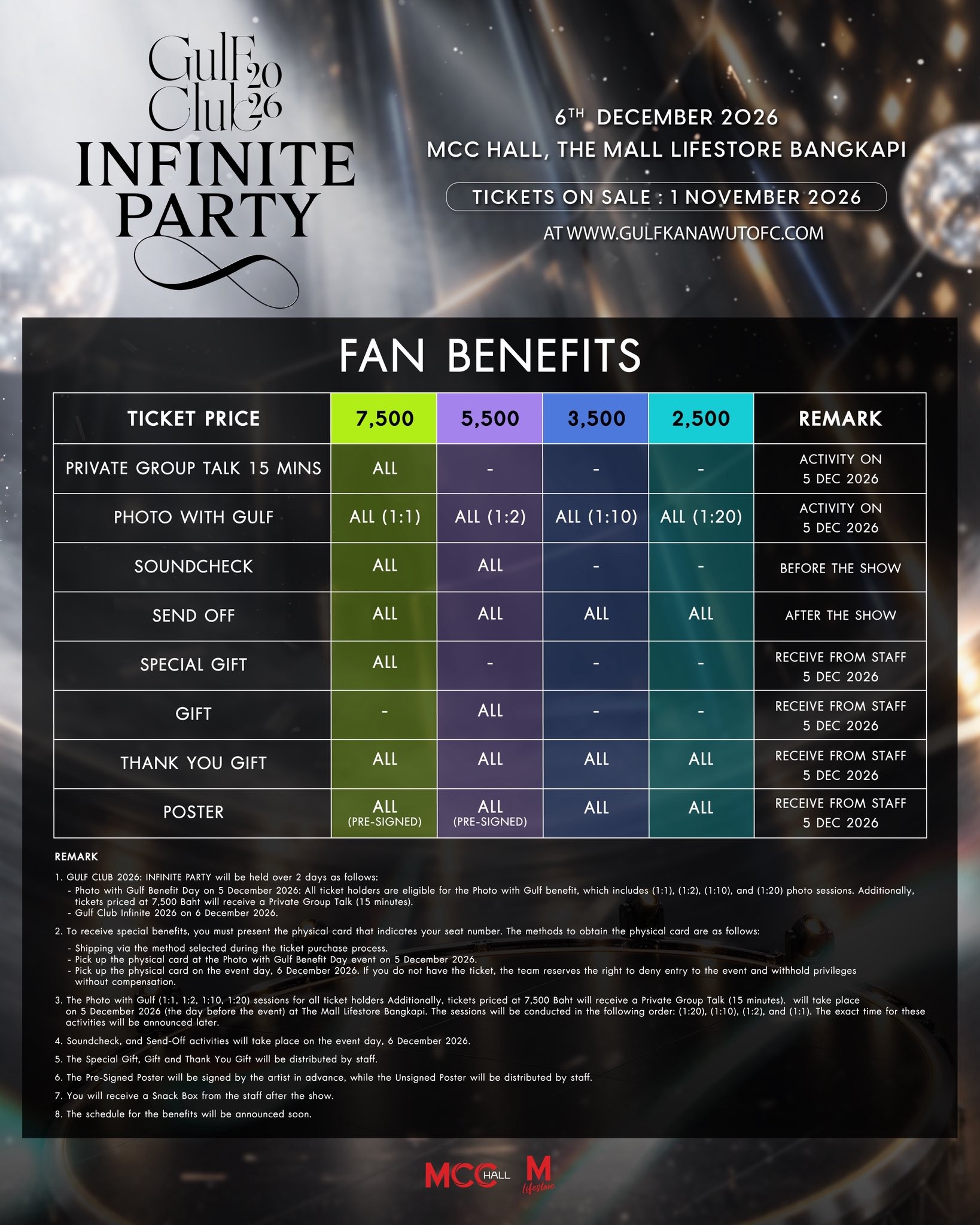
►Photo with Gulf Benefit Day: Saturday, December 5, 2026
►VENUE: MCC HALL, THE MALL LIFESTORE BANGKAPI
►Ticket Prices: 7,500 / 5,500 / 3,500 / 2,500 THB
►Ticket Open: Sunday, November 1, 2026, starting at 10:55 AM (GMT+7) onwards
►Sale channel: https://gulfkanawutofc.com
Terms and Conditions | Ticket Purchase Details and Procedures
1. Account Registration: All prospective buyers must be registered members on https://gulfkanawutofc.com. For this ticket opening, existing users may log in and place orders directly.
2. Ticket Purchasing Process
2.1 Log in using your registered Username and Password.
2.2 Select your preferred Seating Zone.
2.3 Select your seat(s), choose your ticket delivery method (Self Pick-up at venue or EMS postal delivery with a shipping fee of 70 THB, available only within Thailand), then proceed to the next step.
(1) Self Pick-up at Venue: Tickets can be picked up at the venue registration counter starting approximately 4 hours prior to showtime until show start.
(2) EMS Delivery (Recommended to reduce venue congestion): Tickets will be dispatched via Thailand Post approximately 7 days prior to the show date. The tracking number will be updated in the "View My Order" section. Account holders must verify and confirm their delivery address in "View My Order" at least 1 week before the scheduled dispatch date. Incomplete or incorrect address information will result in shipment cancellation without shipping fee refund.
2.4 Choose your payment method and click "Place Order." Buyers have a maximum of 10 minutes to complete the payment transaction per order. Please note that payments must be completed at least 5 minutes before the order timer expires, as late payments carry the risk of processing delays from banking networks or payment gateways in transmitting funds to the destination on time. In cases where payment is made past the allowable time window and tickets cannot be secured, the organizer reserves the right to issue a refund or allocate alternative seating of equivalent value, which may result in not receiving the originally selected seats.
If a payment attempt fails, you may go to the "View My Order" menu to select another payment method and retry within the order's active time frame.
(1) Credit Card / Debit Card / Installment (VISA, MasterCard, JCB, CUP, Alipay): The transaction will be processed through the payment gateway with an additional 4% Convenience Fee. Once successfully paid, the order status will instantly update to "Completed" (no payment slip submission required). If payment fails or you wish to change the card, go to "View My Order" to retry within the order's active time frame.
(2) QR Code / PromptPay: Payment can be completed via any Thai mobile banking application. Upon completion, the order status will instantly update to "Completed" without requiring slip upload. If the transaction is interrupted, please access "View My Order" to retry before the order window expires.
2.5 Each transaction allows a purchase of 1 to 4 tickets. If you wish to purchase more than 4 tickets, you may initiate a second transaction under the same username. Any abnormal booking activity, use of unauthorized bots/automated scripts, or fraudulent actions will result in immediate cancellation of the order and tickets without prior notice, and no refunds will be issued.
3. System Fee & Ticket Format: All ticket prices exclude a ticket processing fee of 50 THB per ticket (and exclude an EMS shipping fee of 70 THB if postal delivery is selected). Tickets for this event are in physical paper format (Paper Ticket) and will be provided according to the distribution method selected during checkout.
4. Remedy & Refund Policy: Once an order has been confirmed and submitted, members are not permitted to change, edit, or cancel their reservations under any circumstances. No refunds or cancellations will be accommodated if you are unable to attend the event after purchase.
5. Authorized Sales & Anti-Scalping Policy: https://gulfkanawutofc.com is the sole authorized ticketing platform for this event. Tickets cannot be resold above face value, traded, exchanged, or transferred for commercial gain. Unauthorized reselling will result in immediate voiding of the tickets without refund or compensation. Tickets acquired from third parties, secondary marketplaces, or unauthorized vendors (such as Viagogo, StubHub, or similar platforms) are invalid and will not be permitted for venue admission.
6. Operator & Ticketing System: This website is operated by Gulf Kanawut Official. The ticketing system is powered and supported by PBTeam.
________________
For Event Inquiries & Official Updates:
* X (Twitter): @Gulfkanawutofc (https://x.com/Gulfkanawutofc )
For Ticketing & Website Inquiries (Customer Support):
* Customer Service: PBTeam Support Portal (https://customer.pbteamth.com/support )
คำถามที่พบบ่อย/F.A.Q
Q1 : สมัครสมาชิกในเว็บไซต์อย่างไร / ใช้ข้อมูลอะไรบ้าง / มีค่าใช้จ่ายหรือไม่?
การสมัครสมาชิกในเว็บไซต์ สามารถทำได้ที่เมนู ‘สมัครสมาชิก’ โดยใช้ข้อมูลดังต่อไปนี้: Username ที่ต้องการ (ตัวอักษรภาษาอังกฤษหรือตัวเลขเท่านั้น ห้ามมีเว้นวรรคหรือสัญลักษณ์พิเศษ), Password, ชื่อ-นามสกุลจริงตามบัตรประชาชน (หรือหนังสือเดินทาง), เพศ, ปีเกิด, ที่อยู่สำหรับจัดส่งเอกสาร, เบอร์โทรศัพท์ และอีเมลที่ติดต่อได้จริง (สมัครฟรี ไม่มีค่าใช้จ่ายใดๆ ทั้งสิ้น)
- หลังการสมัคร ท่านจะได้รับอีเมลจากระบบพร้อมลิงก์ (Link) สำหรับคลิกยืนยันตัวตน (Activate) เพื่อให้บัญชีใช้งานได้ โดยผู้สมัครจะต้องจำ Username และ Password ของตนเองเพื่อนำไปใช้ในการเข้าสู่ระบบเพื่อซื้อบัตรหรือร่วมกิจกรรม
- สำหรับท่านที่ไม่ได้รับอีเมลยืนยันการสมัคร ให้ตรวจสอบในโฟลเดอร์ Junk/Spam หรือลองสมัครใหม่อีกครั้งโดยใช้อีเมลเดิม ระบบจะส่งอีเมลยืนยันให้อัตโนมัติ (แนะนำให้ใช้อีเมลของ Gmail ในการลงทะเบียนเพื่อลดปัญหาการไม่ได้รับอีเมล)
- เมื่อสมัครและกดยืนยันในอีเมลเรียบร้อยแล้ว แนะนำให้ทดสอบเข้าสู่ระบบที่เมนู ‘บัญชีของฉัน’ เพื่อตรวจสอบความพร้อมของบัญชีก่อนวันเปิดจำหน่ายบัตรจริง
- กรุณาตรวจสอบความถูกต้องของข้อมูลส่วนบุคคลทั้งหมดอย่างละเอียดก่อนกดยืนยัน ข้อมูลที่ลงทะเบียนเรียบร้อยแล้วจะไม่สามารถแก้ไขเปลี่ยนแปลงได้ในภายหลัง
Q2 : ลืม Username / Password ทำอย่างไร?
สามารถกดที่เมนู ‘ลืมรหัสผ่าน’ ระบบจะให้ระบุอีเมลที่ใช้ในการสมัครสมาชิก จากนั้นระบบจะส่งลิงก์สำหรับรีเซ็ตรหัสผ่าน (Reset Password) ไปยังอีเมลดังกล่าวพร้อมแจ้ง Username ให้ทราบพร้อมกัน ทั้งนี้ ระบบไม่สามารถส่งลิงก์รีเซ็ตรหัสผ่านหรือแจ้งข้อมูลผ่านช่องทางอื่นนอกเหนือจากอีเมลที่ลงทะเบียนไว้ได้ เพื่อความปลอดภัยของข้อมูลเจ้าของบัญชี
Q3 : เวลาของระบบเป็นเวลาเท่าไหร่ เทียบเวลาได้ที่ไหน?
ระบบของเว็บไซต์ตั้งเวลามาตรฐานตามเวลาของประเทศไทย (GMT+7) ตรงตามเวลาของกรมอุทกศาสตร์ กองทัพเรือ ท่านสามารถเทียบเวลามาตรฐานได้ทางหมายเลขโทรศัพท์ 1811
Q4 : ในวันจำหน่ายบัตร สามารถ Log in ก่อนเวลาเปิดจำหน่ายได้หรือไม่?
สำหรับท่านที่สมัครสมาชิกเรียบร้อยแล้ว สามารถเข้าสู่ระบบได้ที่หน้า 'ตรวจสอบรายการ (View My Order)' โดยระบบจะเปิดให้ทดลอง Log in ก่อนเวลาเปิดจำหน่ายบัตรประมาณ 1 ชั่วโมง
- ก่อนถึงเวลาเปิดจำหน่ายจริงประมาณ 10-15 นาที แนะนำให้ทำการรีเฟรชหน้าเว็บไซต์ (Refresh/F5) และ Log in อีกครั้ง เพื่อเตรียมความพร้อมในการกดเข้าสู่เมนู "ซื้อบัตร" ตามเวลาที่ระบบเปิดจำหน่าย
- ในช่วง 1 ชั่วโมงก่อนเวลาเปิดจำหน่ายบัตร หากเข้าเว็บไซต์แล้วยังไม่แสดงเมนู 'ซื้อบัตร' แนะนำให้ทำการล้างประวัติการเข้าชม (Clear History) และลบคุกกี้ (Cookies/Cache) จากอุปกรณ์ของท่าน แล้วเข้าสู่เว็บไซต์ใหม่อีกครั้ง
Q5 : 1 User สามารถ Log in เข้าใช้งานพร้อมกันได้หลายอุปกรณ์หรือไม่?
1 User สามารถ Log in ใช้งานพร้อมกันได้มากกว่า 1 อุปกรณ์ แต่ทางระบบไม่แนะนำให้กระทำดังกล่าว เนื่องจากมีความเสี่ยงสูงที่จะเกิดการทำรายการจองที่นั่งซ้ำซ้อนกันใน User เดียวกัน และอาจส่งผลให้คำสั่งซื้อถูกระบบปฏิเสธหรือขัดข้อง
- หากระบบตรวจพบพฤติกรรมการจองที่ผิดปกติ การเปิดใช้งานหลายหน้าต่างจนเข้าข่ายปั่นระบบ หรือการใช้โปรแกรมอัตโนมัติ (Bot/Script) ทางผู้จัดงานขอสงวนสิทธิ์ในการยกเลิกคำสั่งซื้อ ตัดสิทธิ์การเข้าชม และอาจระงับการใช้งานบัญชี (Ban Account) ทันทีโดยไม่ต้องแจ้งให้ทราบล่วงหน้าและไม่มีการคืนเงิน
Q6 : ในการจองบัตร 1 ครั้ง สามารถจองได้กี่ใบ / กี่โซน / จองมากกว่าจำนวนที่กำหนดได้หรือไม่?
ในการทำรายการสั่งซื้อ 1 ครั้ง สามารถเลือกจองได้ตามจำนวนที่ระบบกำหนดในแต่ละงาน (ปกติครั้งละ 1–4 ใบ) ในรอบการแสดงและโซนเดียวกันเท่านั้น ไม่สามารถเลือกคละโซนในคำสั่งซื้อเดียวกันได้ หากต้องการจองโซนอื่นเพิ่มเติม หรือต้องการจองเพิ่ม สามารถทำรายการสั่งซื้อรอบใหม่ได้หลังจากคำสั่งซื้อแรกเสร็จสมบูรณ์แล้ว
- ก่อนกดยืนยันการจองบัตร โปรดตรวจสอบจำนวนบัตร โซน และที่นั่งให้ถี่ถ้วน เพราะเมื่อคำสั่งซื้อถูกสร้างขึ้นแล้ว จะไม่สามารถแก้ไขจำนวนหรือเปลี่ยนแปลงที่นั่งได้
- ท่านจะต้องชำระเงินเต็มจำนวนตามยอดรวมของคำสั่งซื้อนั้นๆ ไม่สามารถเลือกชำระเพียงบางส่วนได้
Q7 : จองบัตรเสร็จแล้ว ไม่ได้จดหมายเลขคำสั่งซื้อ (Invoice Number) หรือต้องการตรวจสอบสถานะ ดูได้จากที่ไหน?
หลังจากทำรายการสั่งซื้อสำเร็จ ระบบจะแสดงสรุปข้อมูลคำสั่งซื้อ ได้แก่ หมายเลขคำสั่งซื้อ (Invoice Number), โซน, ที่นั่ง, ยอดชำระเงิน และเวลานับถอยหลังในการทำรายการ โดยท่านสามารถเข้าตรวจสอบรายละเอียดคำสั่งซื้อทั้งหมดได้ตลอดเวลาที่เมนู ‘ตรวจสอบรายการ (View My Order)’
Q8 : วิธีการชำระเงินมีกี่แบบ / มีเวลาชำระเงินเท่าไหร่ / มีค่าธรรมเนียมหรือไม่?
ท่านจะมีเวลาในการทำรายการชำระเงินตามที่ระบบกำหนดในแต่ละรอบคำสั่งซื้อ (โดยทั่วไปไม่เกิน 10–15 นาที) และจำเป็นต้องดำเนินการชำระเงินให้เสร็จสิ้นก่อนเวลาคำสั่งซื้อจะหมดลงอย่างน้อย 5 นาที เพื่อป้องกันความล่าช้าในการส่งยอดประมวลผลจากระบบธนาคารมายังระบบจำหน่ายบัตร
- การชำระเงินผ่านเกตเวย์ทุกช่องทาง (เช่น QR Code / PromptPay หรือ บัตรเครดิต / บัตรเดบิต / ผ่อนชำระ / กระเป๋าเงินอิเล็กทรอนิกส์) อาจมีค่าธรรมเนียมการให้บริการ (Convenience Fee) และ/หรือค่าธรรมเนียมระบบเพิ่มเติมตามอัตราที่กำหนดในแต่ละกิจกรรม โดยท่านสามารถตรวจสอบอัตราค่าธรรมเนียมที่แน่นอนได้จากหน้ารายละเอียดเงื่อนไขและข้อกำหนด (Terms & Conditions) ของแต่ละงาน
- ชำระผ่าน QR Code / PromptPay: เมื่อสแกนจ่ายสำเร็จ ระบบจะตัดยอดและปรับสถานะเป็น "เสร็จสิ้น (Completed)" ให้อัตโนมัติทันที ไม่ต้องส่งหลักฐานการโอนเงิน
- ชำระผ่านบัตรเครดิต / บัตรเดบิต: เมื่อระบบตัดยอดสำเร็จ สถานะจะเปลี่ยนเป็น "เสร็จสิ้น (Completed)" อัตโนมัติทันที
- หากทำรายการไม่สำเร็จ หรือหน้าจอขัดข้อง ให้รีบเข้าไปที่เมนู ‘ตรวจสอบรายการ (View My Order)’ เพื่อเลือกวิธีชำระเงินหรือทำรายการใหม่อีกครั้งภายในระยะเวลาของรอบคำสั่งซื้อ (หมายเหตุ: คำสั่งซื้อที่ชำระเงินไม่ทันภายในเวลา หรือสถานะไม่เปลี่ยนเป็นเสร็จสิ้น จะถูกระบบยกเลิกอัตโนมัติ)
Q9 : รูปแบบบัตรเข้างาน และการรับบัตร (บัตรกระดาษ / E-Ticket / การจัดส่ง EMS) เป็นอย่างไร?
รูปแบบบัตรจะขึ้นอยู่กับข้อกำหนดของแต่ละกิจกรรม โดยท่านสามารถตรวจสอบรูปแบบบัตรของงานที่ท่านจองได้จากหน้ารายละเอียดและเงื่อนไข (Terms & Conditions) ดังนี้:
[1] กรณีกำหนดให้การเข้าชมใช้รูปแบบบัตรอิเล็กทรอนิกส์ (E-Ticket):
- ท่านจะได้รับ E-Ticket แสดงในเมนู ‘ตรวจสอบรายการ (View My Order)’ โดยสามารถกดตรวจสอบและแสดงบัตรผ่านหน้าจอโทรศัพท์ได้เลยหลังจากทำการสั่งซื้อและชำระเงินเสร็จสมบูรณ์แล้ว (โดยทั่วไปจะแสดงในระบบไม่เกิน 24 ชั่วโมง หรือตามระยะเวลาที่ผู้จัดงานกำหนด) เพื่อใช้สแกนเข้าชมงาน
[2] กรณีกำหนดให้การเข้าชมใช้รูปแบบบัตรแข็ง / บัตรกระดาษ (Paper Ticket): การรับบัตรเข้าชมจะมี 2 แบบ ดังนี้
[2.1] กรณีเลือกรับบัตรทาง EMS: บัตรเข้างานจะจัดส่งทางไปรษณีย์ไทยล่วงหน้าก่อนวันงานประมาณ 7 วัน (มีค่าจัดส่งตามที่ระบุในแต่ละงาน) ท่านสามารถตรวจสอบหมายเลขพัสดุ (Tracking No.) ได้ที่เมนู ‘ตรวจสอบรายการ (View My Order)’ และสามารถแก้ไขที่อยู่จัดส่งได้ในหน้าดังกล่าวจนถึงวันปิดรับแก้ไขที่อยู่ตามที่ประกาศ
[2.2] กรณีเลือกรับบัตรเองที่หน้างาน: สามารถนำเอกสารตามประกาศในข้อ Q10 ไปติดต่อรับบัตรเข้างานได้ที่เคาน์เตอร์จำหน่ายบัตรบริเวณหน้าสถานที่จัดงานในวันแสดง
หมายเหตุ: หากต้องการเปลี่ยนรูปแบบการรับบัตร จากรับเองเป็นจัดส่ง EMS หรือเปลี่ยนจาก EMS เป็นรับหน้างาน สามารถทำรายการและชำระค่าจัดส่ง (ถ้ามี) ได้ด้วยตนเองที่หน้า ‘ตรวจสอบรายการ (View My Order)’ ภายในระยะเวลาที่ผู้จัดงานเปิดให้แก้ไข
Q10 : กรณีเลือกรับบัตรกระดาษเองที่หน้างาน ต้องรับที่ไหน และต้องเตรียมเอกสารอะไรบ้าง?
จุดรับบัตรจะเปิดให้บริการ ณ เคาน์เตอร์จำหน่ายบัตรบริเวณหน้างานแสดง ก่อนเวลาเริ่มการแสดงประมาณ 4 ชั่วโมง จนถึงเวลาเริ่มการแสดง (เวลาเปิดจุดรับอาจมีการปรับเปลี่ยนตามความเหมาะสม ขอให้ติดตามประกาศอย่างเป็นทางการทางโซเชียลมีเดียของผู้จัดงานอีกครั้ง) (หมายเหตุ: การรับบัตรจะต้องรับพร้อมกันทั้งคำสั่งซื้อ ไม่สามารถขอแยกรับเฉพาะบางที่นั่งได้)
[1] กรณีเจ้าของ User มารับด้วยตนเอง:
- แสดงบัตรประจำตัวประชาชน หรือหนังสือเดินทาง (Passport) ฉบับจริง ที่มีชื่อ-นามสกุลตรงตามที่ลงทะเบียนไว้
- แสดงหมายเลขคำสั่งซื้อ (Invoice Number) จากหน้า 'ตรวจสอบรายการ (View My Order)' โดยแสดงผ่านหน้าจอมือถือได้
[2] กรณีมอบอำนาจให้ผู้อื่นมารับบัตรแทน: ผู้รับมอบอำนาจจะต้องเตรียมเอกสารฉบับจริงมายื่นให้เจ้าหน้าที่ ณ จุดรับบัตร ดังนี้:
- สำเนาบัตรประชาชน หรือสำเนาหนังสือเดินทางของเจ้าของ User (พิมพ์ลงกระดาษ) พร้อมเซ็นรับรองสำเนาถูกต้อง และเขียนข้อความมอบอำนาจชัดเจน: "สำเนาถูกต้อง ข้าพเจ้า (ชื่อ-นามสกุลเจ้าของ User) ขอมอบอำนาจให้ (ชื่อ-นามสกุลของผู้รับแทน) เป็นผู้รับบัตรงาน...[ชื่องาน]... หมายเลขคำสั่งซื้อ (Invoice Number)......... แทนข้าพเจ้า"
- บัตรประชาชน หรือหนังสือเดินทางฉบับจริงของผู้มารับแทน (เพื่อแสดงยืนยันตัวตนต่อเจ้าหน้าที่)
- หมายเลขคำสั่งซื้อ (Invoice Number) (เอกสารสำเนามอบอำนาจที่เป็นกระดาษ เจ้าหน้าที่จะต้องเก็บไว้เป็นหลักฐานเพื่อความปลอดภัยของเจ้าของบัตร)
Q11 : การประกาศรายชื่อผู้โชคดี / กติกาการเข้าชมและสิ่งของต้องห้าม / ผังจุดรับฝากของ / สินค้าออฟฟิเชียล ติดตามได้ที่ไหน?
รายละเอียดการร่วมกิจกรรม สิทธิ์ Benefit, ผังงาน, กติกาการเข้าชม, สิ่งของต้องห้าม, จุดรับฝากของขวัญศิลปิน ตลอดจนสินค้า Official Merchandise (ถ้ามี) โปรดติดตามประกาศอย่างเป็นทางการผ่านช่องทางโซเชียลมีเดียหลักของผู้จัดงาน ขอให้ผู้ถือบัตรทุกท่านติดตามประกาศอัปเดตโดยตรงจากทางผู้จัดงานอย่างสม่ำเสมอ
Q12 : กรณีเป็นบัตรยืน (Standing Ticket) มีการจัดเรียงลำดับคิวเข้าชมงานอย่างไร และตรวจสอบคิวได้เมื่อไหร่?
การจัดเรียงลำดับคิวเข้าชมสำหรับบัตรยืน จะยึดตามลำดับการสั่งซื้อที่ทำรายการและชำระเงินสำเร็จ โดยคำนวณจากหมายเลขคำสั่งซื้อ (Invoice Number) ของระบบ ซึ่งมีข้อกำหนดและหลักการจัดเรียงดังนี้:
- การแยกคิวตามโซน: ลำดับคิวบัตรยืนจะแยกกันอย่างเป็นอิสระในแต่ละโซน ไม่ได้นำคิวทุกโซนมารวมกัน ดังนั้น ระบบจะนำหมายเลขคำสั่งซื้อ (Invoice Number) ของผู้ซื้อที่อยู่ภายในโซนเดียวกันเท่านั้นมาจัดเรียงตามลำดับก่อน-หลัง
- การเปรียบเทียบลำดับคิวข้ามโซน: เนื่องจากลำดับคิวแยกตามโซน ผู้ซื้อที่ได้หมายเลขคำสั่งซื้อ (Invoice Number) ก่อนหน้า แต่อยู่คนละโซน อาจได้ลำดับคิวที่มากกว่า (คิวช้ากว่า) ผู้ซื้อในอีกโซนหนึ่งได้ ขึ้นอยู่กับจำนวนผู้ที่กดซื้อสำเร็จในแต่ละโซนนั้นๆ เป็นสำคัญ
- ระยะเวลาการประกาศลำดับคิว: ระบบจะดำเนินการประมวลผลและแสดงหมายเลขคิวบัตรยืนของท่านให้ตรวจสอบได้ที่เมนู ‘ตรวจสอบรายการ (View My Order)’ ภายในประมาณ 7 วัน หลังจากการสั่งซื้อเสร็จสมบูรณ์
========================================
[EN] Frequently Asked Questions (Master FAQ)
Q1 : How to register an account on the website? / What information is required? / Is there any registration fee?
Account registration can be completed under the 'Register' menu using the following details: Desired Username (English letters or numbers only; no spaces or special characters), Password, Full legal name as shown on national ID card or passport, Gender, Year of birth, Mailing address, Phone number, and a valid email address (Registration is completely free of charge).
- After registering, you will receive an automated system email containing an activation link to activate your account. Members must remember their Username and Password to log in for ticket purchases or related activities.
- If you do not receive an activation email, please check your Junk/Spam folder or retry registering using the same email address. The system will automatically resend the confirmation email (Gmail accounts are strongly recommended to ensure smooth delivery).
- Once registered and activated, it is recommended to test logging in via the 'My Account' menu to verify account readiness prior to ticket opening.
- Please verify all personal details thoroughly before confirmation. Registered information cannot be edited or modified later.
Q2 : What should I do if I forget my Username or Password?
Click on 'Forgot Password'. The system will prompt you to enter the email address used during registration. A password reset link along with your Username will be dispatched to that email address. For account security, password reset links cannot be delivered through any other channels.
Q3 : What system time does the website follow, and how can I synchronize my clock?
The ticketing platform operates strictly on Thailand Standard Time (GMT+7), synchronized with the Hydrographic Department of the Royal Thai Navy. Standard time can be checked by dialing 1811 (within Thailand).
Q4 : Can I log in prior to the ticket opening time on the sale date?
Registered members may log in via the 'View My Order' page approximately 1 hour prior to ticket opening.
- About 10–15 minutes before sales commence, members are advised to refresh the page (F5/Refresh) and log in again to ensure readiness to access the "Buy Ticket" button at the exact scheduled opening time.
- If the "Buy Ticket" menu does not appear within 1 hour before ticket open, please clear your browser history, cache, and cookies before accessing the website again.
Q5 : Can 1 User Account be logged in simultaneously on multiple devices?
A single account can technically be logged in on multiple devices simultaneously; however, this is strongly discouraged due to high risks of duplicate seat selections or transaction collisions, which may lead to order errors or rejection.
- If abnormal booking patterns, excessive concurrent sessions, or unauthorized automated scripts/bots are detected, the organizer reserves the right to immediately cancel orders, deny entry, and suspend/ban the account without prior notice or refund.
Q6 : How many tickets/zones can be purchased per transaction? / Can I purchase more than the limit?
Each booking allows a ticket quantity specified for each event (generally 1–4 tickets per transaction) within the same show session and seating zone only. Cross-zone purchases within a single order are not permitted. If you wish to purchase other zones or additional tickets, a separate order can be placed after the initial order is completed.
- Please verify your ticket quantity, zone, and seat selections carefully before confirming, as orders cannot be amended or seats changed once placed.
- Full payment covering the total order amount must be settled in one single transaction; partial payments are not supported.
Q7 : Where can I check my order details if I did not record my Invoice Number, or want to view order status?
Upon order completion, a summary screen will display your Invoice Number, Zone, Seat number(s), Total payable amount, and remaining payment countdown timer. You can also view complete details at any time by accessing the ‘View My Order’ menu.
Q8 : What payment methods are accepted? / How much time is allocated for payment? / Are there transaction fees?
Buyers are given a designated payment window per order (typically 10–15 minutes) and must complete the transaction at least 5 minutes before the order timer expires to prevent banking gateway transmission delays from causing order expiration.
- Payment processing across gateways (such as QR Code / PromptPay, Credit/Debit Cards, Installments, or E-Wallets) may incur Convenience Fees and/or ticketing system charges based on individual event policies. Precise fee rates are listed in each event's Terms & Conditions.
- Payment via QR Code / PromptPay: Once scanned and successfully paid, the order status updates to "Completed" automatically without requiring payment slip upload.
- Payment via Credit/Debit Cards: Once the gateway successfully charges the card, the status updates to "Completed" automatically.
- If payment fails or is interrupted, promptly navigate to the ‘View My Order’ menu to select an alternative payment method and retry within the active order timer. (Note: Orders not settled before time expires or failing to reach "Completed" status will be automatically cancelled by the system).
Q9 : What ticket formats are available, and how are tickets received (Paper Ticket / E-Ticket / EMS Delivery)?
Ticket formats depend on specific event requirements. Please verify the ticket format from the event's Terms & Conditions as follows:
[1] Electronic Ticket Events (E-Ticket):
- E-Tickets will be accessible directly in the ‘View My Order’ menu upon successful order completion and payment confirmation (generally appearing within 24 hours or according to the organizer’s schedule). The digital ticket on your mobile device is used for gate scanning.
[2] Physical Paper/Plastic Card Events (Paper Ticket): Ticket collection is available in 2 methods as follows:
[2.1] EMS Delivery: Physical tickets will be dispatched via Thailand Post approximately 7 days before the show date (shipping fees apply per event terms). You can check your Tracking Number in ‘View My Order’ and update delivery addresses up until the announced address cut-off deadline.
[2.2] Venue Self Pick-up: You may bring valid verification documents as announced in Q10 to collect tickets at the venue ticketing counter on the show date.
Note: If you wish to change the delivery method from Self Pick-up to EMS, or from EMS to Self Pick-up, you can manage the request and settle shipping fees (if applicable) directly in the ‘View My Order’ menu during the organizer's allowable modification period.
Q10 : For venue paper ticket pick-up, where is the counter located and what documents must be presented?
The pick-up counter opens at the venue approximately 4 hours prior to showtime until the show begins (operating hours may adjust based on organizer announcements). (Note: Ticket redemption must be fulfilled for the complete order; partial seat redemption is strictly prohibited).
[1] Pick-up by the Account Holder:
- Original National ID Card or Passport matching the registered member's full legal name.
- Invoice Number shown from the ‘View My Order’ page on a mobile device.
[2] Pick-up via Proxy / Authorized Representative: The authorized representative must present physical hardcopy documents to staff at the counter:
- A printed photocopy of the Account Holder's ID Card/Passport with original signature certifying true copy and explicit power of attorney statement: "Certified true copy. I, (Account Holder's Name), hereby authorize (Representative's Name) to collect the tickets for [Event Name], Invoice Number ......... on my behalf."
- Original ID Card or Passport of the authorized representative for physical verification.
- Invoice Number. (Physical signed proxy documents will be retained by staff for security and auditing purposes).
Q11 : Where can I find winner announcements, entry rules, prohibited items, gift collection points, and official merchandise?
Event participation guidelines, fan benefits, venue layouts, prohibited items, artist gift drop-off points, and official merchandise updates (if applicable) will be officially announced directly on the organizer's primary social media channels. Attendees are advised to follow official announcements regularly.
Q12 : For Standing Tickets, how is the queue admission sequence arranged, and when can I check my queue number?
The queue number for standing tickets is arranged chronologically based on successfully completed purchases, referenced by the system's Invoice Number according to the following criteria:
- Queueing Separated by Zone: Standing queue numbers are managed independently per zone and are not pooled together across the venue. The system will sort the Invoice Numbers only among attendees who booked within the exact same zone on a first-come, first-served basis.
- Cross-Zone Queue Comparison: Because each zone runs its own independent queue numbering, an attendee holding an earlier Invoice Number in one zone may receive a higher queue number (a later entrance position) than someone in another zone with a later Invoice Number, depending entirely on the total transaction volume within each respective zone.
- Queue Display Timeline: Your official standing queue number will be processed and displayed in the ‘View My Order’ menu within approximately 7 days after the purchase is completed.
ประกาศการจัดส่งบัตร
Annoucement for upgrade and change seat
วิธีการซื้อบัตร / How to Buy